



Today, we will introduce the file system in the Windows operating system, specifically the FAT file system. Strictly speaking, it is the DOS file system. Today we will introduce the oldest version of FAT, the FAT12 file system.
1. Disk Layout of the FAT File System
Before diving into more details of the file system, it is necessary to understand its overall disk layout, i.e., how data is arranged. This will help us gain a deeper understanding of the file system.
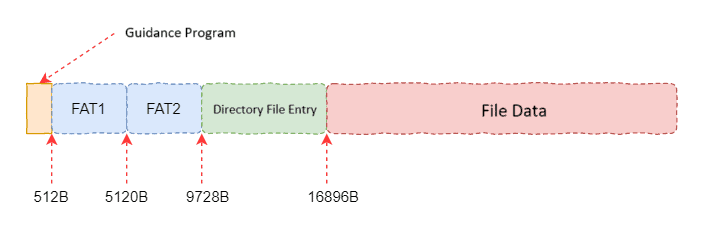
As shown in the above diagram, the FAT file system is divided into five main areas: Boot Sector, FAT1, FAT2, Directory Entries, and File Data. FAT1 and FAT2 are the File Allocation Tables, which are the core of the FAT file system and are used to describe the usage of disk space. It is important to note that these values are just examples and are not fixed. They usually need to be calculated based on the data in the boot sector.
2. Boot Sector
The boot sector is unique to the Windows operating system and contains the OS boot code. For the file system, this sector serves a role similar to the superblock in the Linux file system, containing overall descriptive information about the file system. The following diagram shows the front part of this sector, where the size of the FAT table is described at offset 22.
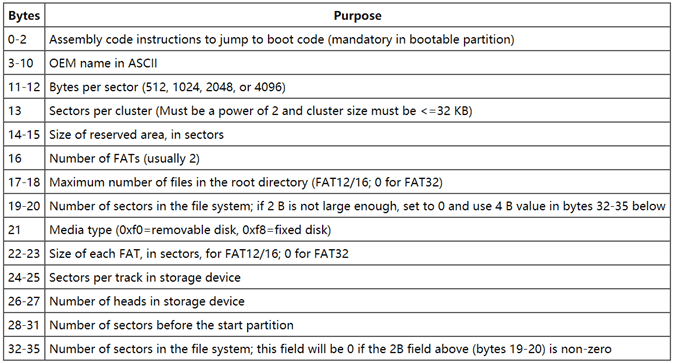
It can be seen that the disk layout of the FAT file system is dynamic. The offset information described in Figure 1 is not fixed and is determined during formatting. This information can be found in the boot sector.
3. Directory Entries
This area is equivalent to the root directory of the FAT file system. All files or directories start from here. Each file or directory is described by the structure shown below. This includes file name, extension, file attributes, and the data location of the file.
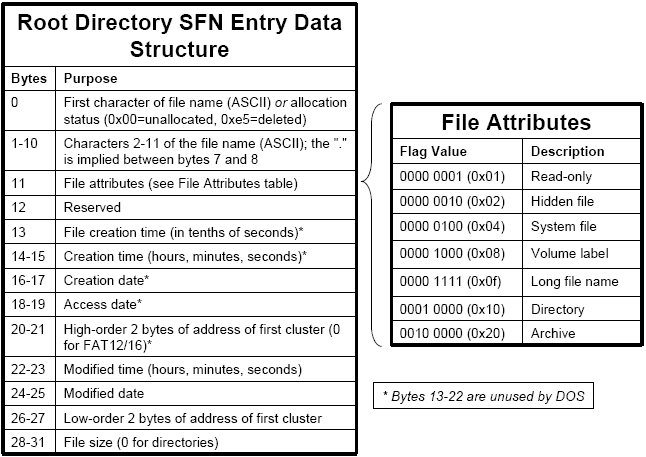
This data structure is similar to an inode in Linux, and each entry occupies 32 bytes of space. The space for directory entries in the disk layout can be detailed as shown below. Each block represents one data structure from the diagram above. The important contents in this structure are the file name and the starting address of the file data.

With the starting address of the file data, we know where the data is stored. How do we find other data? This is where the File Allocation Table comes in.
4. FAT – File Allocation Table
If we zoom in on the FAT table, FAT12, it consists of many 12-bit numbers. These 12-bit numbers are called FAT entries, each corresponding to a cluster in the file data area. This entry indicates whether the corresponding data cluster is used and where the next data cluster of the file is located, with specific differences indicated by the values.
5. Data Instance Analysis
We can analyze the data layout of FAT through an example. Suppose we use the Ubuntu 18.04 platform. We can use the dd command to generate a 1MB file, and then use a loop device to simulate the file as a block device. After that, we can format it using mkfs.fat. The following shows the created file after formatting.

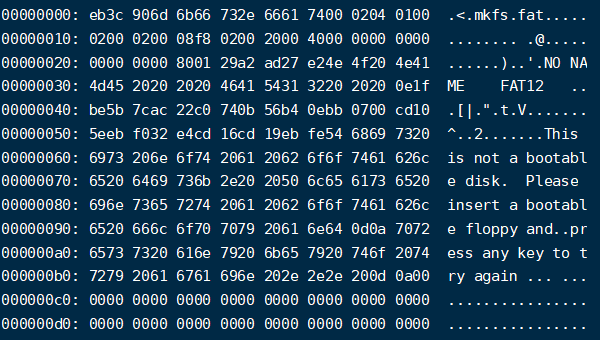
After completing the above operations, we have essentially created a FAT file system within the file. We can then open this file with Vim to analyze the data inside. For example, the content of the boot sector is shown below. We can compare its contents with the relevant data in the previous tables to gain a deeper understanding.
That’s all for today’s content. I hope it is helpful to everyone. We will write a dedicated article later on how to analyze disk data.
Related:

Disclaimer: This article is created by the original author. The content of the article represents their personal opinions. Our reposting is only for sharing and discussion purposes and does not imply our endorsement or agreement. If you have any objections, please get in touch with us through the provided channels. Show Respect to the original author SUNNY ZHANG of Oracle software engineer.